Introduction to SharePoint Video Integration with YouTube
In the digital age, video content has become an integral part of corporate communication, training, and project management. SharePoint, as a collaborative platform, provides organizations with the tools to manage projects and employee activities effectively. By integrating YouTube videos into SharePoint using a simple formatting template, companies can streamline communication and enhance user engagement. This article will explore how linking YouTube videos in SharePoint is facilitated by this template, fitting into broader organizational frameworks such as charting, visual status indicators, and project management.
Embedding YouTube Videos in SharePoint: The Simple Template Solution
Using the video integration template from
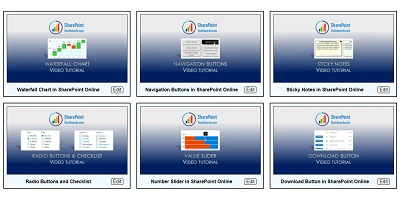
SharePointDashboards.com, organizations can easily embed YouTube video links within their SharePoint environment. The template requires only a YouTube Video ID and a Title, allowing users to present video tiles at a glance. These tiles provide a preview of the content, enticing viewers to watch the video directly from the SharePoint site. Consequently, this straightforward approach unifies internal communication by incorporating multimedia seamlessly, minimizing the need for external applications or complex IT solutions.
Significance in Charting and Visual Status Indicators
Video content, when implemented properly, can supplement traditional project management tools such as Gantt charts and visual dashboards. By using this template, project managers can introduce instructional videos, training clips, or motivational content and integrate them directly into project dashboards. This provides additional layers of information and engagement, allowing teams to understand progress holistically. Video cards can act as visual status indicators, providing immediate context and reducing the guesswork associated with interpreting data dashboards.
Enhancing Project and Employee Management
With the presence of video cards, project and employee management transitions smoothly into a multimedia-enhanced process. For training purposes, video content uploaded on YouTube can serve as structured e-learning modules embedded directly into SharePoint, allowing employees to enhance their skills conveniently. Videos related to ongoing projects can keep team members updated with progress and strategies, ensuring consistency across departments. The inherent visual component of videos aids in retaining information better than traditional text-based updates.
Tracking Progress through Video Engagement
Including videos in SharePoint also provides opportunities for tracking employee engagement and measuring the effectiveness of video content. By monitoring which video links are most frequently accessed, project managers and HR departments can assess which areas require more focus and what training resources prove most beneficial for the team. Moreover, engagement statistics offer insights into productivity levels across different projects.
Setting Up the Template in SharePoint
To implement this feature, SharePoint users can navigate to
SharePointDashboards.com where they will find a straightforward copy-and-paste template. This requires minimal setup, as the main customization lies within the look and feel of video cards, controlled by various visual settings available on the site. Configurations include border styling, background colors, font styles, and more, ensuring a seamless integration with the existing corporate design language.
SharePoint JSON Formatting Made Easy
The integration is streamlined through SharePoint JSON formatting, which configures list views to display YouTube video cards effectively. JSON, or JavaScript Object Notation, allows data interchange and can be applied to a SharePoint list view by using the provided template, automatically generating dynamic video tiles. This method ensures that no complex coding is required on the part of the user, making it accessible to all levels of technical expertise.
Use Case Scenarios for Enhanced Productivity
Several scenarios illustrate the practicality of embedding video content into SharePoint:
- Training Sessions: For organizations investing in employee development, SharePoint can house video libraries of recorded training sessions. As an example, new hires may quickly acquaint themselves with company protocols or past projects by accessing these videos.
- Project Updates: Project leaders can post project walkthroughs or updates as videos, ensuring stakeholders and team members receive firsthand information on developments without schedule-dense meetings.
- Executive Communications: Executive messages can be communicated via video for direct, personalized communication, fostering a stronger company culture and more effective leadership visibility.
- Product Demonstrations: Sharing product demos within SharePoint allows sales and marketing teams to present standardized product information effortlessly to employees and clients.
Conclusion
Integrating YouTube video links into SharePoint with a simple template transforms traditional project management and employee tracking into a vibrant, information-rich process. By combining the functionalities of SharePoint with YouTube's extensive video platform, companies can provide immediate, engaging content right at their employees' fingertips. This innovation not only aligns with current digital consumption habits but also empowers organizations to elevate their communication strategies, training modules, and overall employee engagement.