



SharePoint Combo Button Makes Every SharePoint List Better - May 30, 2026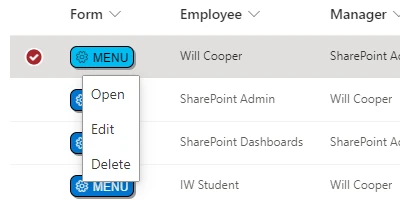
The SharePoint Combo Button: A Game-Changer for List ManagementNavigating lengthy menus or searching for command bar options can be a hassle when managing SharePoint lists. However, the SharePoint Combo Button revolutionizes this experience by providing one-click access to the most common list record operations such as Edit, View, and Delete. By introducing a focused menu upon clicking the button, this tool minimizes time wasted and enhances usability. This article explores how the SharePoint Combo Button can be a potent weapon in the arsenal of charting, visual status indicators, project management, employee management, and tracking.Understanding the Role in Charting and Visual Status IndicatorsFor businesses dependent on clear visual status indicators and data charting, the SharePoint Combo Button is invaluable. Before diving into specifics, consider what these indicators represent-progress, completion, or an alert to act. By providing quick edit or view options through the SharePoint Combo Button, users can swiftly modify or check any data influencing these indicators with unprecedented efficiency. This becomes an essential feature in scenarios where project deadlines and employee performance metrics need constant monitoring. For example, a project manager checking project status indicators can swiftly edit or view task statuses, ensuring that team members are on track. Real-time updates ensure that team dashboards are always reflective of current realities, fostering more accurate decision-making.Enhancing Project and Employee ManagementIn project management, swift access to relevant data is crucial. The SharePoint Combo Button simplifies project oversight by allowing quick updates to timelines and task statuses. Imagine a project manager who uses the button to immediately view and edit project tasks without navigating complex menus. This rapid access negates delays, facilitating a seamless flow of information essential for meeting project objectives. Similarly, in employee management scenarios, the SharePoint Combo Button allows HR personnel or team leads to quickly update performance data or view employee details. Rapid data retrieval ensures managers can respond effectively to employee needs and adjust workload distributions accordingly. By simplifying these administrative processes, the Combo Button enhances productivity and ensures fluid communication across departments.Tracking Made EasierTracking various performance metrics and progress often involves access to intricate datasets stored in SharePoint lists. The SharePoint Combo Button's one-click approach to data retrieval and modification optimizes this aspect of business operations, promoting a seamless interaction with complex datasets. For example, data analysts leveraging tracking tools can swiftly pivot between different data records, ensuring that they can update or validate KPIs on the go. This capability significantly reduces time spent and thus improves overall data integrity and reliability.Setting Up the Combo Button in SharePointIntegrating the SharePoint Combo Button into any SharePoint list is an uncomplicated process that requires only a few steps. A designated column to hold the Combo Button is first established. Users then visit SharePointDashboards.com, from where they can seamlessly copy and paste the provided template into their SharePoint environment. This straightforward setup process means that the Combo Button can be readily incorporated into any SharePoint list, rendering it a versatile tool suited to diverse operational contexts. Furthermore, the platform is replete not just with the Combo Button template but also with hundreds more, ensuring a wide array of configurable options to optimize list operations.SharePoint JSON Formatting: A Critical ComponentJSON formatting within SharePoint is pivotal for creating an optimized list view, especially when applying templates such as those provided at SharePointDashboards.com. This aspect of SharePoint customization allows users to incorporate the Combo Button into lists using a simple application of a template. JSON formatting effectively grants users the flexibility to manipulate the list appearances and functionalities, further streamlining the data interaction process. Once the template is applied to a SharePoint list view, users witness a transformation in how data is managed and operated upon. The interface becomes sleeker, enabling intuitive data handling without user hassle, thereby aligning with the broader objective of optimizing productivity through structured data accessibility.Real-World Use Case ScenariosTo fully grasp the potential of the SharePoint Combo Button, consider several real-world scenarios. A construction project manager utilizes it to streamline project updates, ensuring all stakeholders receive instant notifications of changes. In another scenario, a retail chain manager easily pivots between viewing and modifying inventory records, ensuring inventory levels are maintained accurately. Moreover, an HR manager tracking employee performance data can swiftly navigate between different employee records, using the ease of the Combo Button to enter new performance metrics. These scenarios highlight how wide-ranging the application of the SharePoint Combo Button is across varied business contexts and illustrate its capacity to enhance efficiency and support effective process management.Conclusion: Maximizing Efficiency with SharePointDashboards.comThe SharePoint Combo Button represents a significant advancement in list management, catering to the burgeoning need for quick data access in modern operational environments. By eliminating unnecessary complexities in data interactions, this tool facilitates streamlined processes across organizations. With its easy setup enabled through templates available at SharePointDashboards.com, the Combo Button opens a gateway to refined project management, robust employee tracking, and real-time visual indicators. Adopting the SharePoint Combo Button can transform how businesses interact with their data-fostering a more productive, informed, and responsive workplace.Watch a video to learn more:
|


